
Sign in to continue

Looks a lot better, yep. Not sure that 200% is always too big, this text isn't huge. But sure, I'll take it!

I can always look at upping the 200% font size if people want. It's fairly easy to change the range now that I've set it up. Might up it to 300 when I set it up on properly.
If anymore colours are wanted as well just say. Easy way to find a selection is by going to colorpicker.com and letting me know. Figured what I have at the moment is a pretty broad selection anyway.

Tried using your toolbar... it doesn't work for me... is it me? is it windows 8.1? is it the alcohol? I don't know but I blame you anyway... you have on job and that's to come here and fix it...
So it's just me?
Sen, have you tired this - http://www.4wforums.com/topic-6-upgrade … html#p2362

Spent yesterday and today when free working on a new toolbar with better functionality.
Here's what it looks like. Got a few things to work on still before adding it to the forum. If anyone has ideas on what they'd like on it, let me know and I'll consider it 🙂.
In order, there's Bold, Italics, Underline, Strikethrough, Center, Size, Quote, Image, YouTube, URL Link, Code, Spoiler, Colour Palette, Smilies.
Should note that size works in percentages - only valid options are between 50 and 200 as under 50% is just too small and over 200% is too big. There's plenty of versatility within the available range.
Default:

After Clicking on the Colour button (clicking again closes):

After Clicking on the Smilies button (clicking again closes):

With both Colour and Smilies:

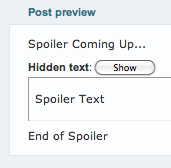
Spoiler tag:

Spoiler tag when shown:
Comic Book News - Like the Facebook Page - Follow CBN on Twitter